User Input in App Meditation: How It Shapes Your Practice

User input is the primary mechanism by which meditation apps transform generic audio libraries into personalized, context-aware practices that address your specific emotional state and energy needs. Without it, every session sounds the same regardless of whether you’re recovering from a brutal week at work or simply winding down before sleep. Apps like Mosaiic and AI-driven systems studied in clinical research demonstrate that when users describe their current situation, mood, and goals, the resulting sessions produce measurably better outcomes. The role of user input in app meditation is not a feature. It is the foundation.
How meditation apps collect and use user feedback
Meditation apps gather two distinct types of user input: explicit and behavioral. Understanding both helps you engage more intentionally with any platform you use.
Explicit inputs are things you actively provide:
- Mood check-ins before or after a session (“How tense do you feel right now?”)
- Stress ratings on a numerical scale
- Goal selection such as focus, sleep, anxiety relief, or energy recovery
- Technique preferences like body scan, breathwork, or visualization
- Guidance level preferences, from fully narrated to minimal cues
Behavioral inputs are signals the app reads passively:
- Which sessions you skip or replay
- Time of day you typically practice
- Average session duration you complete versus abandon
- How your choices shift after stressful versus calm days
Multi-agent systems integrate all six user input dimensions simultaneously to produce expert-aligned, coach-like guided meditations. That level of integration is what separates a truly adaptive app from one that simply offers a mood filter. Mosaiic, for example, asks you to describe your situation in plain language, then writes and narrates a session specific to that context. The app does not ask you to pick from a dropdown. It reads what you actually say.
Pro Tip: When you first open a meditation app, treat the onboarding questions as seriously as you would a conversation with a therapist. Vague answers produce vague sessions.

What evidence supports user input improving meditation outcomes?
The science behind personalized meditation is no longer preliminary. A 2026 ACM CHI study examined 75 users over multiple weeks using an LLM-driven mindfulness system. The results were statistically significant across three dimensions: engagement improved (p=0.011), self-awareness increased (p=0.014), and momentary stress reduced (p=0.020). These are not marginal gains. They represent the difference between a practice that sticks and one that gets deleted after two weeks.
“Simple queries like ‘How tense do you feel right now?’ help the app address immediate user state beyond past behavior.” — Can Meditation Apps Adapt to You?
The implication is direct: apps that ask better questions produce better sessions. Research also shows that platforms using user-stated goals reduce browsing time and increase session consistency. When you do not have to hunt for the right session, you practice more often. That consistency compounds over time in ways that a single well-designed session never can.
The clinical picture also points to a trust variable. Transparency about data handling fosters psychological safety, which is critical for users to engage deeply and reliably with meditation content. If you do not trust the app with your stress data, you will not give honest answers. Dishonest answers produce irrelevant sessions. The feedback loop breaks before it starts.
Real-time input vs. historical behavior: which drives better personalization?
Both matter, but they serve different functions. Here is how they compare directly:
| Input type | Strengths | Limitations |
|---|---|---|
| Real-time explicit input | Captures your current emotional state with precision | Requires effort; users may skip check-ins |
| Historical behavioral data | Learns patterns without burdening you | Can overfit to habits rather than actual needs |
| Hybrid model | Balances responsiveness with convenience | Requires thoughtful design to avoid confusion |
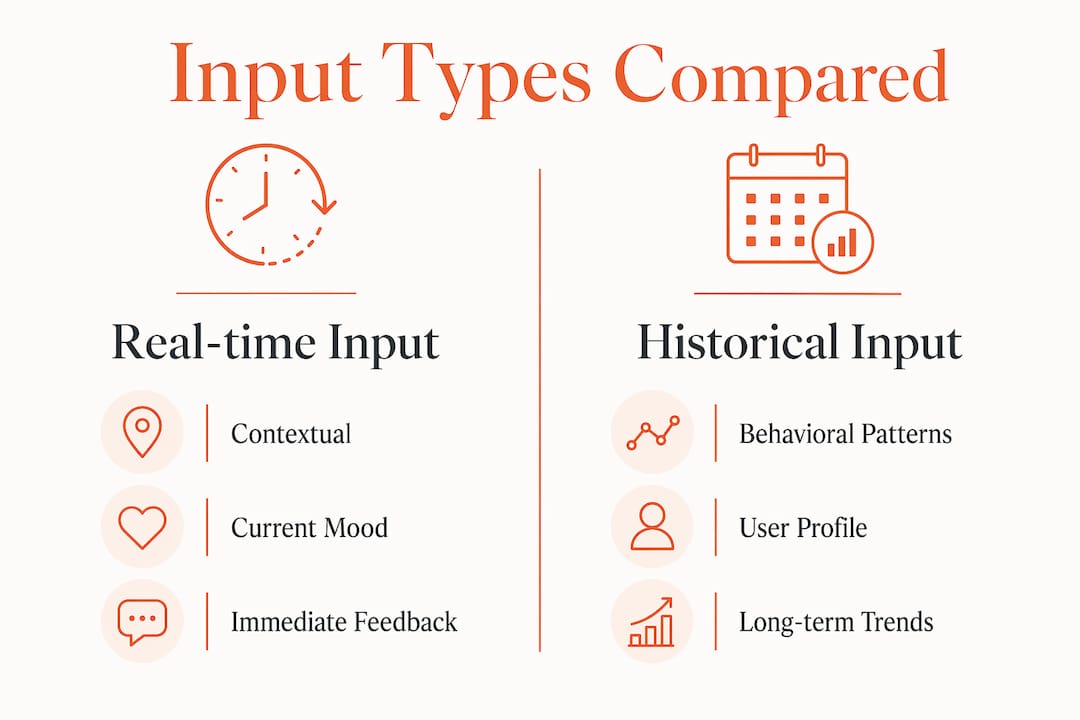
Real-time input wins on contextual relevance. If you had a conflict at work this afternoon, your behavioral history from last month cannot capture that. Context-aware apps recognize your changing needs throughout the day, adjusting recommendations rather than assuming a static user state. That responsiveness is what makes the difference between a session that lands and one that feels off.
Historical behavior, on the other hand, builds a useful profile over time. AI models that cluster users by type, such as “high-stress, short-session, evening listener,” can speed up recommendation accuracy. The risk is repetitiveness. If the app only serves what you have chosen before, it stops expanding your practice. Explicit input corrects that drift.
Hybrid human-and-AI support models that combine automation with user corrections provide the most nuanced and trustworthy personalization. Mosaiic’s approach reflects this: each day’s session builds on the last, but your current description of what is draining you resets the direction when needed. You can read more about how daily practice builds momentum when both signals work together.
Pro Tip: If your app offers a post-session rating or reflection prompt, use it every time. That two-second input is how the system learns whether yesterday’s session actually helped.
Privacy, transparency, and trust in collecting user input
Collecting sensitive self-report data, including stress levels, emotional states, and personal struggles, carries real ethical weight. The way an app handles that data determines whether you engage honestly or hold back.
Three practices define trustworthy apps in this space:
- Clear data explanations. The app should tell you exactly what it stores, how long it keeps it, and whether it shares anything with third parties. Users abandon tools that do not clearly explain data storage, usage, and protection of sensitive inputs like stress levels. That abandonment is not irrational. It is self-protective.
- Opt-in controls. Sensitive inputs like mood ratings or personal situation descriptions should never be mandatory. Giving users the choice to share or skip specific data types increases the quality of what they do share.
- Minimal collection by design. More data is not always better. Over-collection without clear purpose leads to user overwhelm and tool abandonment. The best apps collect what they need, use it immediately, and measure whether it helped.
The ethical design of user experience for sensitive data in wellness apps is a discipline in itself. Interfaces that ask too many questions at once, or that bury privacy settings, signal that the product was built for data extraction rather than user benefit. You can usually tell within the first three sessions whether an app respects your input or just harvests it.
For context-specific sessions that handle personal situations with discretion, Mosaiic’s approach to context-specific meditation shows how ethical design and personalization can coexist without compromise.
How to get more from your meditation app through better input
Getting the most from any personalized meditation platform comes down to how you engage with its input features. These steps apply whether you use Mosaiic or any other adaptive app.
- Rate your mood honestly before every session. A 7 when you feel a 3 produces a session calibrated for someone who is doing fine. The app cannot help you if you are not accurate.
- Set specific goals rather than generic ones. “I want to feel less anxious about my presentation tomorrow” is more useful than “I want to relax.” Specificity drives relevance.
- Prioritize apps that work without hardware. Behavioral signals and direct user input alone can drive effective adaptation. You do not need an EEG headset to get a personalized session. Software-based personalization is mature enough to deliver real results.
- Use post-session feedback prompts. These are not optional extras. They are how the system learns whether the session matched your actual state. Skipping them slows the personalization loop.
- Describe your situation in your own words when the app allows it. Free-text input gives the system far more signal than a mood slider. The more specific you are, the more specific the session becomes.
Understanding how meditation apps differ from classes also helps you calibrate your expectations. Apps that use your input well can match the contextual relevance of a good one-on-one session. Apps that ignore it cannot, regardless of how polished the audio sounds.
Key takeaways
User input is the variable that determines whether a meditation app adapts to your life or simply plays audio at you.
| Point | Details |
|---|---|
| Explicit input drives relevance | Mood ratings, stress levels, and goal descriptions produce sessions matched to your current state. |
| Behavioral data builds your profile | Skipping patterns and session history help apps learn your preferences without extra effort from you. |
| Hybrid models outperform either alone | Combining real-time input with historical behavior produces the most accurate and responsive personalization. |
| Trust is a prerequisite | Transparent data practices increase honest input, which directly improves session quality and retention. |
| Minimal, purposeful collection works best | Apps that collect fewer, more meaningful inputs and measure their effect outperform those that over-collect. |
Why I think most users underestimate their own role here
Most people download a meditation app expecting the app to do all the work. They tap play, listen for five minutes, and wonder why it does not feel relevant. The uncomfortable truth is that personalization is a two-way contract. The app can only be as specific as the information you give it.
I have watched this pattern repeat across the wellness technology space. The users who report the strongest results are not the ones who found the best app. They are the ones who engaged most honestly with the input features. They described their actual situation. They rated sessions accurately. They used the reflection prompts. The app responded in kind.
There is also a subtler point worth making. The act of articulating what is draining your energy, before a session even begins, is itself a form of self-awareness practice. You are not just feeding data to an algorithm. You are naming what is wrong. That naming has therapeutic value independent of what the app does next. Research on AI companion apps for emotional wellbeing supports this. The input process and the meditation process are not separate steps. They are part of the same practice.
The future of this space will involve richer input without more burden. Voice-based check-ins, shorter prompts, and smarter inference from minimal data will reduce friction. But the underlying principle will not change. The more honestly you show up, the more the app can meet you where you are.
— Giorgio
Try Mosaiic for sessions built around your input
Mosaiic is a personalized meditation app built on exactly the principles this article describes. You describe what is draining your energy, whether that is burnout, a rough stretch, or a loss of motivation, and Mosaiic writes and narrates a five-minute session specific to that context. Each day’s session builds on the last, so the app evolves as you do. The positioning is deliberate: energy, not just calm. Sessions are designed to leave you fuller, not sleepier. Free, Starter, and Daily tiers are available. If you want a practice that actually responds to your life, start with Mosaiic today.
FAQ
What types of user input do meditation apps collect?
Meditation apps collect explicit inputs like mood ratings, stress levels, and goal selections, as well as behavioral signals like session history and skipping patterns. The most effective apps use both to produce context-aware, personalized sessions.
Does user input actually improve meditation outcomes?
Yes. A 2026 ACM CHI study of 75 users found that LLM-driven personalization based on user input produced statistically significant improvements in engagement (p=0.011), self-awareness (p=0.014), and stress reduction (p=0.020).
Do I need special hardware for personalized meditation apps?
No. Behavioral signals and direct user input alone can drive effective personalization without EEG headsets or wearables. Hardware features should be optional, not required for a quality experience.
How do I know if a meditation app handles my data responsibly?
Look for apps that clearly explain what data they store, offer opt-in controls for sensitive inputs, and collect only what they need. Apps that bury privacy settings or ask excessive questions at onboarding are worth scrutinizing before you share personal stress data.
Why does my meditation app keep recommending the same sessions?
Repetitive recommendations usually mean the app is over-relying on your behavioral history without enough explicit input to correct it. Using post-session feedback prompts and updating your mood or goal inputs regularly breaks that loop and restores relevance.